Contents
Multi-Agent Customer Support Optimization
Through automated parameter optimization of a 116-parameter multi-agent customer support system, Lucidic achieved 92% accuracy—a 20% relative improvement over the baseline.
20% Gain
from 75% to 92% accuracy
116 Parameters
optimized across 5 agents
Months → Weeks
vs traditional tuning
Accuracy on Multi-Agent Customer Support System
Baseline
Lucidic AI Optimized
0%
10%
20%
30%
40%
50%
60%
70%
80%
90%
100%
95%
100%
Non-Regression Test
90%
97%
Easy
82%
95%
Medium
50%
77%
Hard
Accuracy (%)
Background
A major client deployed a customer-support agent that handled three core tasks: answering account and policy questions, updating account information, and executing "complex, non-account related tasks". While the agent covered the intended workflows, its real-world performance did not meet internal quality expectations. On launch, the customer's satisfaction metric measured the agent at 50% accuracy.
Over the next 2–3 months, the engineering team made steady but manual improvements—rewriting prompts, restructuring context, refining tool descriptions, and adjusting agentic logic. These iterations brought the agent to the mid-60% range and eventually to ~75%, but further progress stalled. The system had become increasingly complex, and each adjustment introduced new regressions elsewhere. Existing tooling such as DSPy's prompt optimizer and reinforcement-learning approaches could not reliably automate improvements at this scale.
The organization needed a systematic way to optimize the entire agentic workflow and break past the plateau.
Goal
The objective was to apply our proprietary agentic training algorithm to the customer's existing multi-agent workflow and systematically improve its performance. Rather than relying on manual prompt tuning or incremental architectural tweaks, the aim was to automatically explore and optimize the agent's prompts, context, tools, and decision logic to break through the 75% plateau and deliver measurable, production-ready gains in accuracy, stability, and efficiency.
Key Findings
Overall performance increased 75% to 92% on these real customer queries
The biggest gains came from stabilizing test cases, where accuracy on similar queries increased from 60% to 95%
Most importantly, the improvements reduced agentic non-determinism, making the system far more stable run-to-run and more reliable overall
Changing the model from everything being GPT-5 to a combination of GPT-5, Claude Sonnet 4.5, Claude Haiku 4.5, and Gemini 2.5 Flash with new prompts was a very big indicator
All prompts for different providers looked very different which means that there are pros and cons to prompt ordering + content
Token usage decreased by 20%, while accuracy went up due to context debloating
The trainable parameters of "layers" helped boost the performance for harder test cases
Aside
The key insight here is that teams often get stuck in local minima with their agentic setups. Every time you try to fix one part, something else breaks, and you end up spending all your time chasing regressions instead of actually improving the system. This kind of iteration should be automated. Developers should focus on good test cases and solid agent structure—not on hand-crafting prompts for obscure edge cases or rebuilding their pipeline every time a new model comes out. With that in mind, let's walk through the solution.
Setup
Before we made any changes, the customer's support agent followed a simple routing flow. A triage step would decide which of three sub-agents should handle an incoming request:
1.
A Q&A Agent that answered questions about a user's account, company policies, or general "why did this happen?" explanations.
2.
A Account-Management Agent that made updates to account-level fields like name, admin status, or billing information.
3.
A Action Agent that handled tasks outside the account itself—things like adding items to a cart, modifying product settings, or updating values on different parts of the platform.
On paper, this setup looks clean and easy to manage.
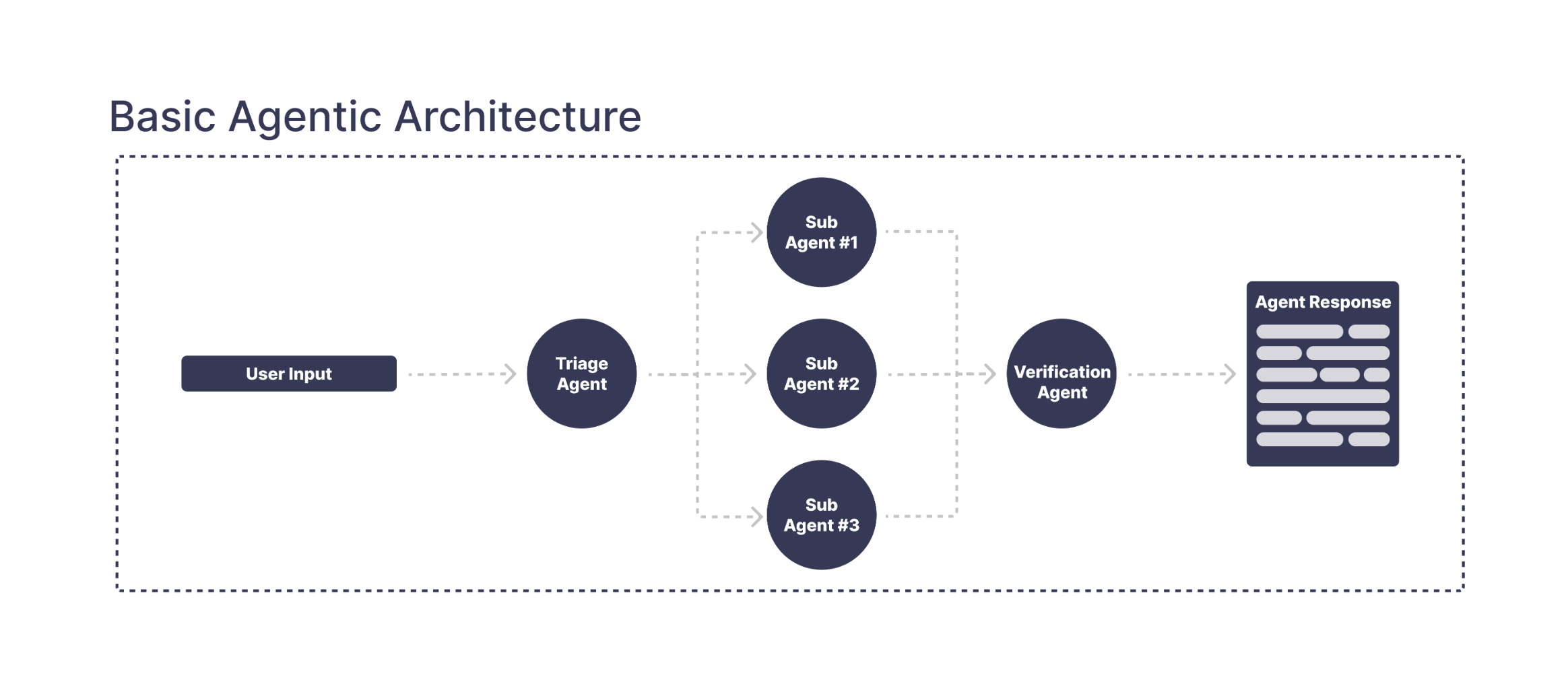
This diagram only shows the high-level routing. In reality, each part of the agent hides dozens of trainable components—RAG pipelines, context-management rules, prompt blocks, tool schemas, model choices, feature flags, and more. What looks like a clean three-agent setup is actually a dense network of moving pieces, all of which influence each other.
Here's an actual diagram of how the agent looks.
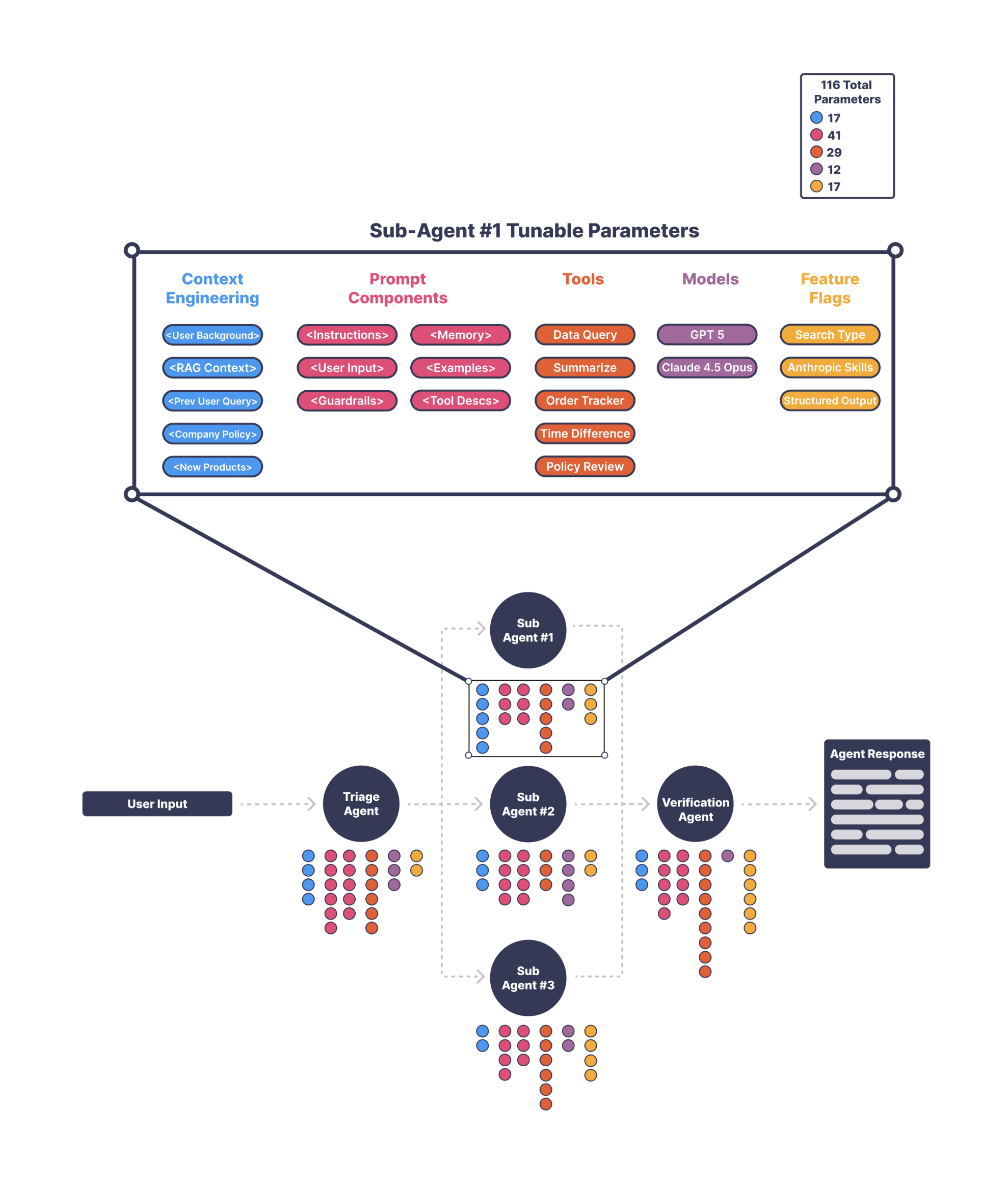
Once we looked past the simple diagram, it was clear the agent was made up of many trainable parts—prompts, tools, retrieval steps, context rules, and model choices—all interacting in subtle ways. The space of possible configurations was huge, and manual iteration could not realistically explore it.
That's exactly why we built a training platform for agentic systems: something that can search through these possibilities, test them at scale, and surface the patterns that actually move performance forward.
Now let's dive into what we changed.
Our Solution
Triage Agent
The triage agent's job was to decide what the user was actually asking for—answer a question, make an account change, take a product-level action, or split a multi-intent request. Even though this should have been one of the simpler parts of the system, about 3%–4% of the overall failures were coming from here.
The First Issue
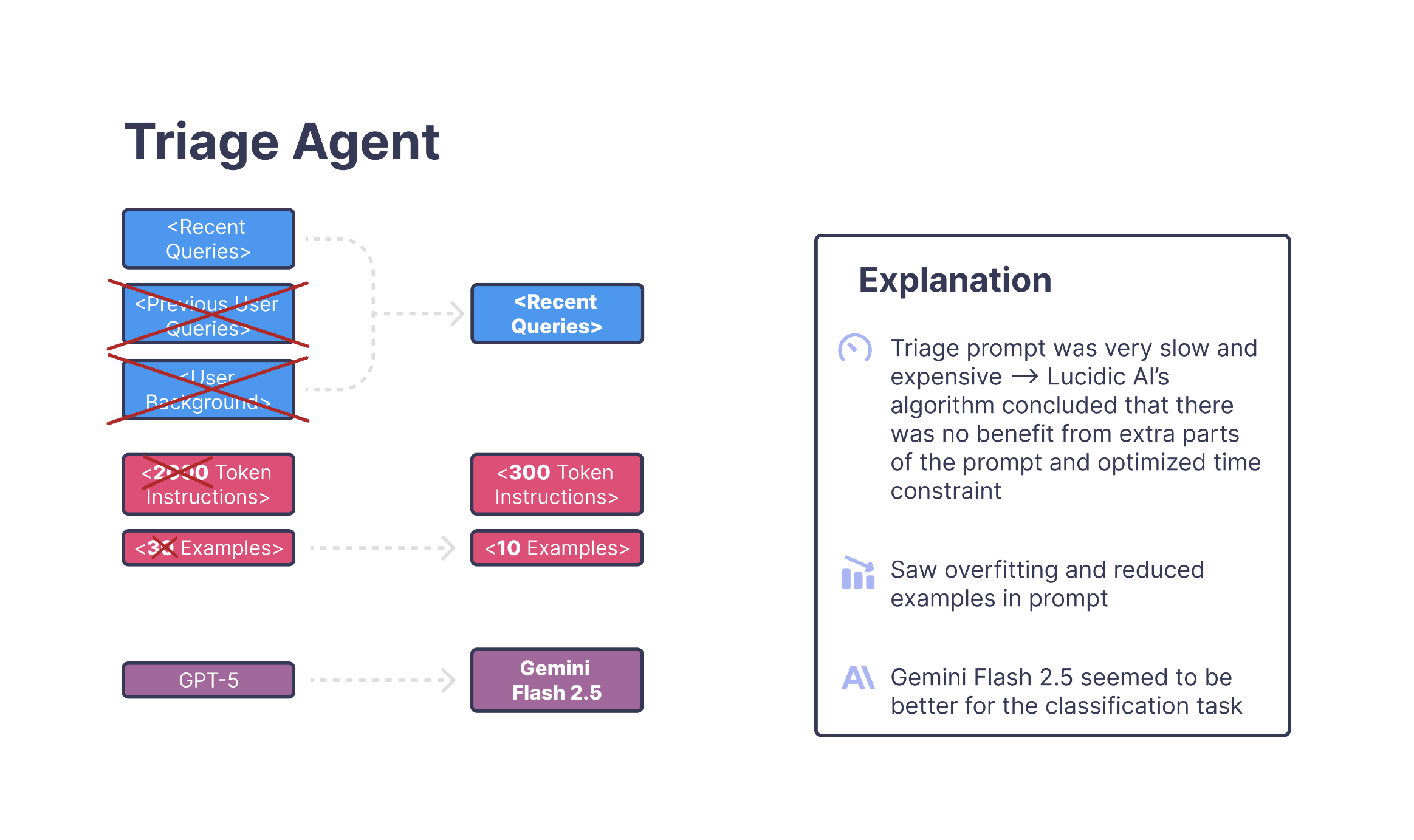
The first issue the training algorithm uncovered was that the prompt was carrying too much context through feature flags. These flags were meant to provide optional background information, but over time they had accumulated into a large block of text that was being injected into nearly every triage call. Most of it wasn't relevant to the user's latest message, and removing that extra context immediately made the classifier more focused and less distracted by unrelated details.
A Second Pattern
A second pattern emerged around the examples. There were simply too many, and the model had begun overfitting to specific phrasing. A request like "Change my shipping address and cancel the item I ordered today" should always count as multi-intent, but before optimization, this test bounced between three different labels across ten runs. Once the algorithm reduced the examples and rewrote the instructions to be more direct, these cases became consistent.
The Final Change
The final change came from model selection. After the prompt was trimmed down, the algorithm found that Gemini 2.5 Flash handled this shorter, cleaner structure far more reliably than the original GPT-5 setup. Once all three adjustments were applied, the triage agent stopped oscillating between classifications and this small but stubborn slice of error disappeared.
Takeaway
The triage agent didn't need more logic—it needed less noise from feature-flag context, simpler instructions, and a model aligned with the task. The algorithm found that combination quickly, and the stability issues vanished.
Note
One thing this section really highlighted for us is just how much hidden work sits inside prompt optimization. The algorithm ended up running through thousands of tiny variations—changing phrasing, adjusting examples, removing stray pieces of context—and evaluating each of them against batches of triage cases. A researcher could have eventually found the same combination, but it would have taken an enormous amount of manual testing and revision. This is exactly the kind of problem that's impractical to solve by hand and well-suited for automated search.
Q&A Agent - Planning Stage
Each of the three sub-agents followed the same workflow: a planning stage followed by an execution stage. For the Q&A agent, the planning step was especially important because it had to decide how to answer the user's question and which tools—sometimes several—to call along the way.
The Problem
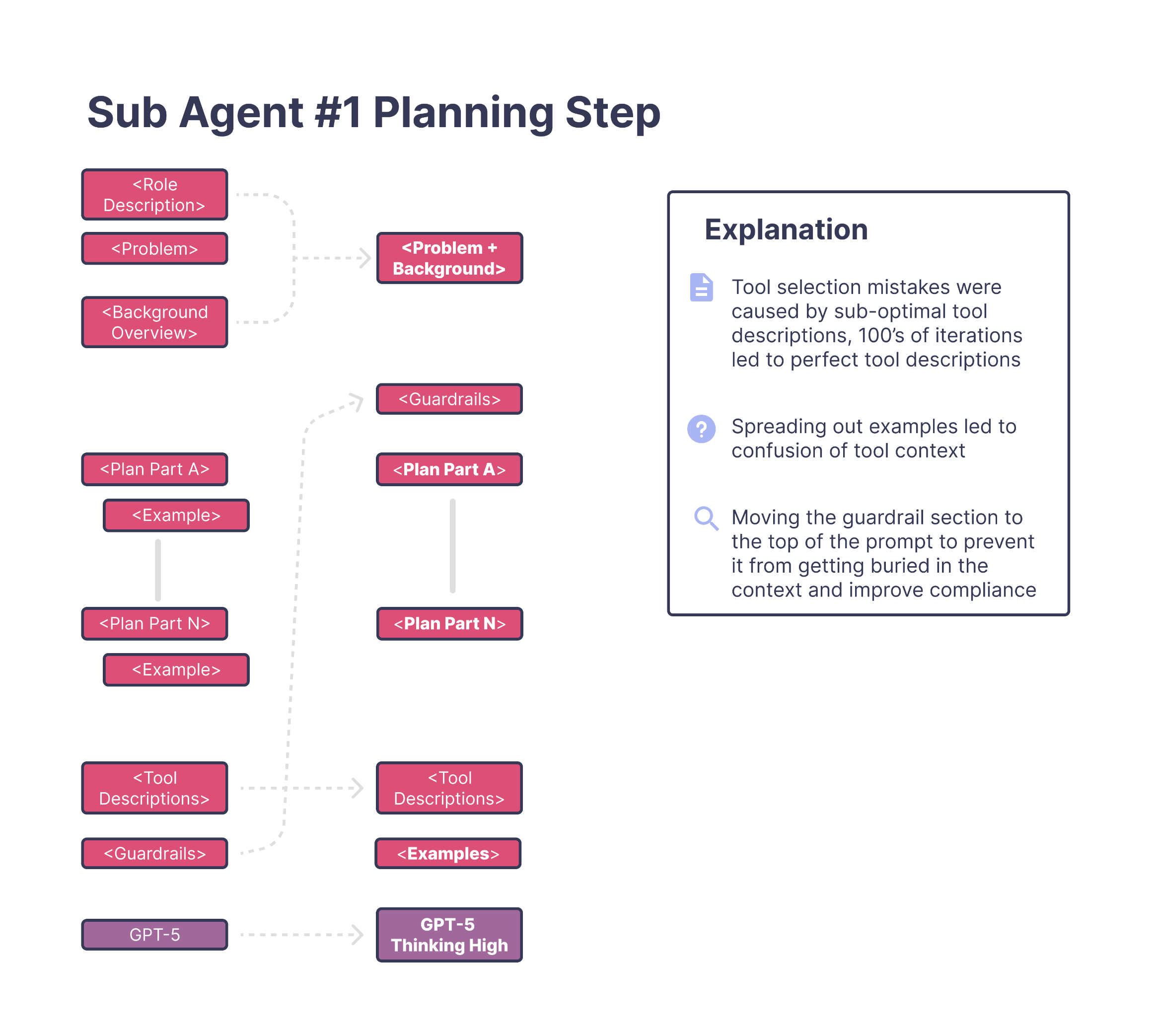
The original planning prompt had grown extremely large. It was split into multiple sections—framing text, a long problem description, a planning overview, several "part A/B/C" blocks, examples, guardrails, and a long list of tools. On paper it looked structured, but in practice it forced the model to interpret too many instruction styles at once.
The Solution
When the training algorithm explored variations of this structure, it converged on a much simpler design. All of the framing and overview text was merged into one clear problem statement. About a third of the planning instructions were rewritten to be more direct, while the rest were kept as-is. This made it much easier for the model to understand what it needed to do without switching between multiple instruction formats.
Tool Descriptions
The most important change, however, was the tools. Almost every tool description needed to be rewritten. The Q&A agent frequently relies on tools to answer queries like:
"How many products have I bought that include warranty repairs?"
Questions like these require multiple tool calls, and if the planning prompt doesn't describe each tool clearly, the model ends up forming the right intent but choosing the wrong tool. This is exactly what we saw in testing—many failures weren't conceptual mistakes, they were tool-selection mistakes.
During ablation studies, this pattern became impossible to ignore. Whenever the algorithm experimented with prompt changes, the versions that improved accuracy almost always involved modified tool descriptions (there were 100s of tests, testing these changes). It was the strongest signal across the entire search. For this agent, tools weren't just helpful—they were the deciding factor in whether the plan made sense.
One example came from a tool whose description had slowly expanded over months of incremental edits. The original version looked something like this:
get_user_purchase_history
"Returns information about things a user has bought in the past, including past items, transaction details, subscription-related purchases, refunds, exchanges, warranty-covered items, and any product interactions tied to their account. Can also retrieve timestamps and metadata depending on what is available."
It wasn't wrong, but it was doing far too much. The model had no clean boundary for when this tool should be used versus other tools that handled subscriptions, invoices, or product metadata. This led to planning errors where the model understood the user correctly but picked the wrong tool to execute the plan.
After optimization, the algorithm rewrote it into something much clearer:
get_user_purchase_history
"Returns only completed past purchases for the user. Do not include subscriptions, invoices, product metadata, or warranty information."
That one change dramatically reduced ambiguity. The tool meant "purchase history," and now it finally acted like it. The algorithm applied similar clarifications across many tools, and the planning step immediately became more consistent as a result.
Once the tools were rewritten and the prompt was simplified, the algorithm also discovered that using GPT-5 with high-effort thinking handled this planning structure far more reliably than the previous setup.
Just switching the model and cleaning up the planning instructions produced an 8%-9% improvement on its own.
Takeaway
For the Q&A agent, tool clarity was everything. The algorithm learned that better tool descriptions, paired with a cleaner planning prompt and the right model, removed most of the inconsistency that had previously caused failures.
Note on Why This Matters
It's worth pausing here to call out something people often underestimate: at the end of the day, an LLM is just tokens in and tokens out. Every plan the agent forms, every tool it chooses, every step it takes is driven entirely by the prompts and context we feed it. Prompt and context engineering are easy to dismiss, but in practice they shape almost all of an agent's behavior.
We've spent a long time automating this layer, and across projects we've seen 50%–60% improvements that come purely from rewriting prompts and restructuring context. Our system treats prompts not as static text but as parameters that can be searched, recombined, and optimized. Under the hood, we use a mix of Tree-Structured Parzen Estimator (TPE), CMA-ES, and RL-inspired exploration to evaluate thousands of variations.
But even with these tools, the search space is still massive. Standard optimization alone isn't enough—you also need a way to break prompts apart, rewrite instructions, reweight context, and restructure tool descriptions in a way the algorithm can reliably explore. That was one of the hardest parts of the platform to build, and it's what allows the system to find improvements that would take a researcher countless hours of manual trial-and-error.
Now that the planning stage is covered, the next thing to talk about is some of the feature flags and parameters the algorithm optimized around context. During training, it discovered a few surprisingly effective "context engineering" tricks—clever combinations of feature flags, lightweight memory, and RAG-style lookups. The explanation is simplified here, but the intuition is that the system learned when certain context should be included, when it should be skipped entirely, and how to adapt the context window based on the user's request.
Q&A Agent – Context Optimization
After the planning changes, the next meaningful improvement came from how the Q&A agent handled context. This agent answered questions about the user, their account, and the platform, and it relied heavily on the surrounding context to decide which tools to call and how to structure a response. The problem was that the agent's context window had grown into a giant bucket of information: product details, account metadata, common FAQ-style snippets, and various "just in case" fields. Everything was being passed into every query.
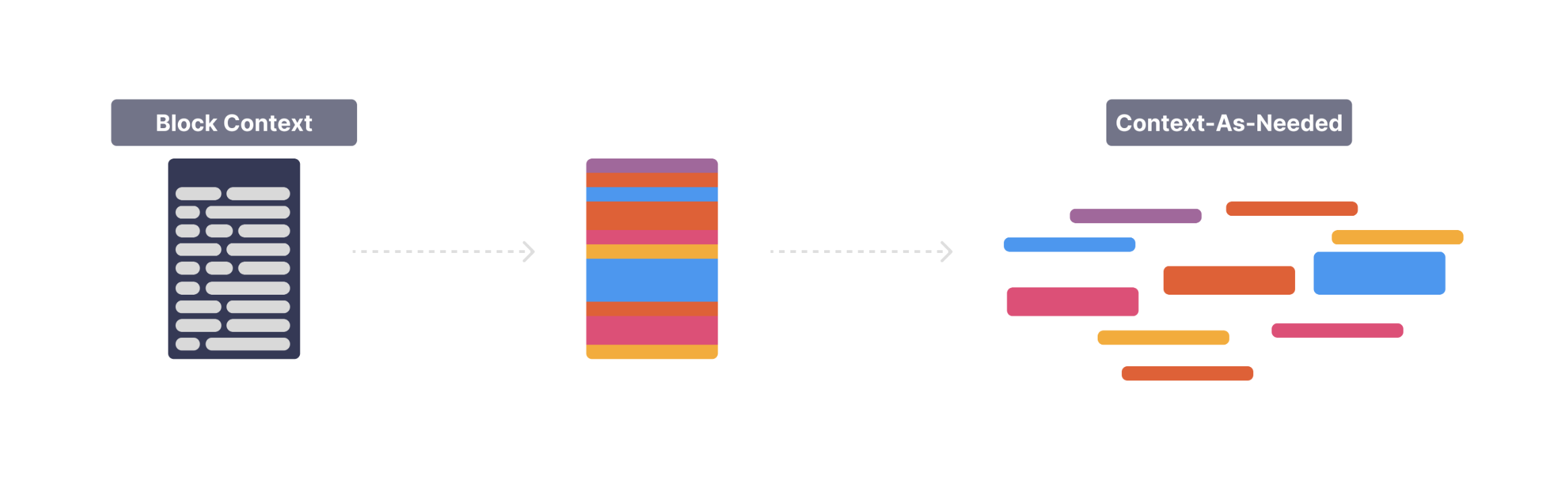
All of these pieces were controlled by feature flags, so the training algorithm could treat them as parameters and explore which context actually mattered. That's where things got interesting. Instead of leaving everything in the window, the algorithm learned a more adaptive pattern—something closer to lightweight RAG, but based on user intent rather than documents.
The idea was simple: only include the parts of context that were actually relevant to the question. For example:
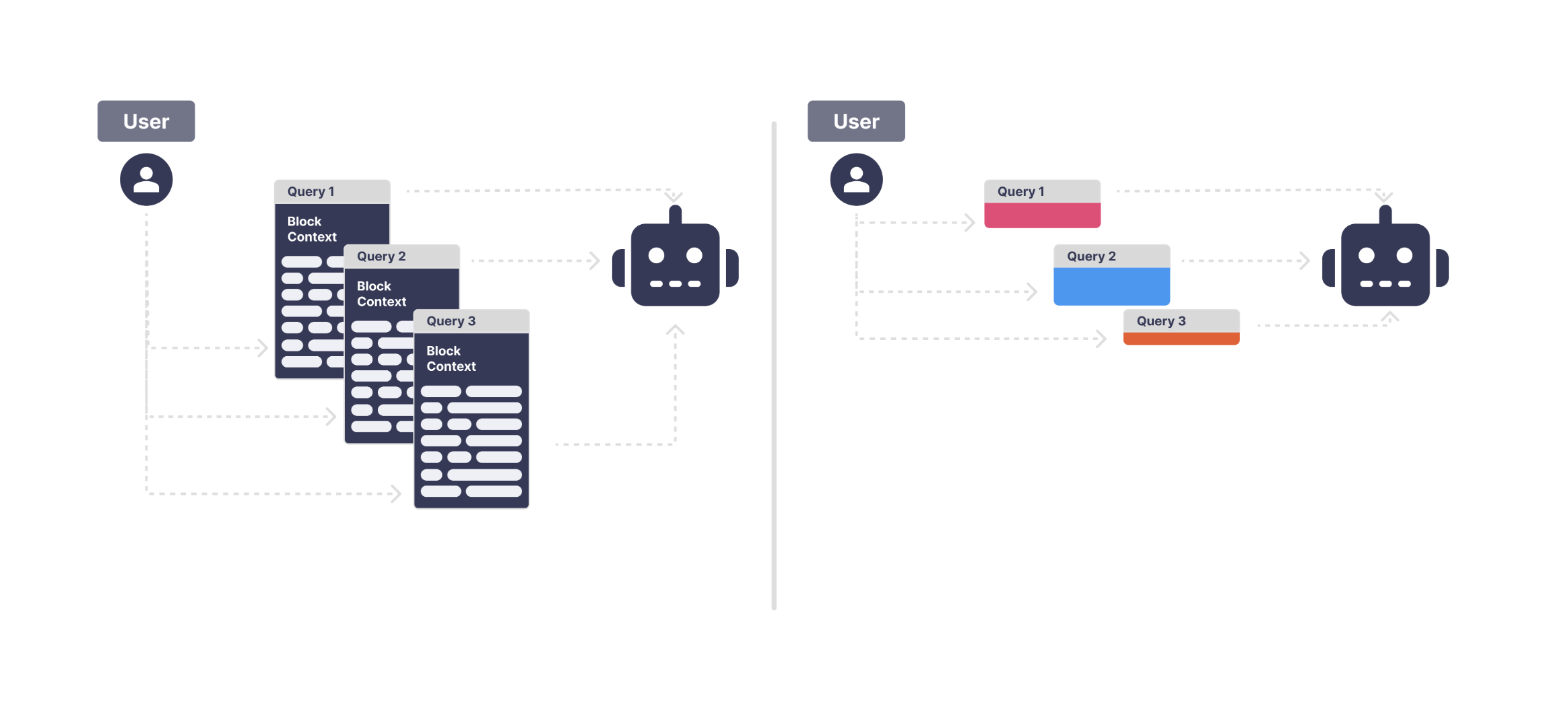
Before:
The entire product catalog, release notes, specs, and user settings were always included.
User: "How does Product 1 work?"
→ The model had to sift through everything.
After:
The algorithm learned to enable just the "New Product Releases" feature flag for this type of query, pulling in only the information connected to Product 1.
User: "How does Product 1 work?"
→ Only Product 1–related context appears.
Another example came from financial queries:
All account-related context was injected, including invoices, credits, payment methods, usage summaries, etc. User: "What would my balance be if I buy X?" The model often latched onto the wrong part of the context because "balance" was vague.
The algorithm learned to swap in a much tighter context slice—for this case, payment types and pricing rules—instead of the entire financial history.
In simpler terms, the agent learned to "fetch the right variable" instead of dumping everything into the prompt. Because these variables were feature flags, the algorithm could flip them on or off and compare thousands of variations. Over time, it discovered that a small set of highly relevant context snippets consistently outperformed the giant static context block the system originally used.
This mattered for two reasons. First, a cleaner context window reduced confusion and improved tool selection. Second, by shrinking the prompt significantly, it made the model more deterministic—cases that previously flipped between multiple answers now produced stable outputs.
Takeaway
Instead of treating context as a static block, the algorithm turned it into a dynamic parameter. By combining feature flags, memory, and lightweight retrieval, it learned when to include context, when to exclude it, and how to pick the most relevant pieces for each query. This adaptive context alone recovered a surprising amount of accuracy that the original system couldn't reach.
Account-Updating Agent
The biggest gains for this agent also came from rewriting the prompts and cleaning up the context window, but we've already covered how the algorithm handled those across the entire workflow. The more interesting part here was how the system learned to deal with the sheer number of tools involved in account updates.
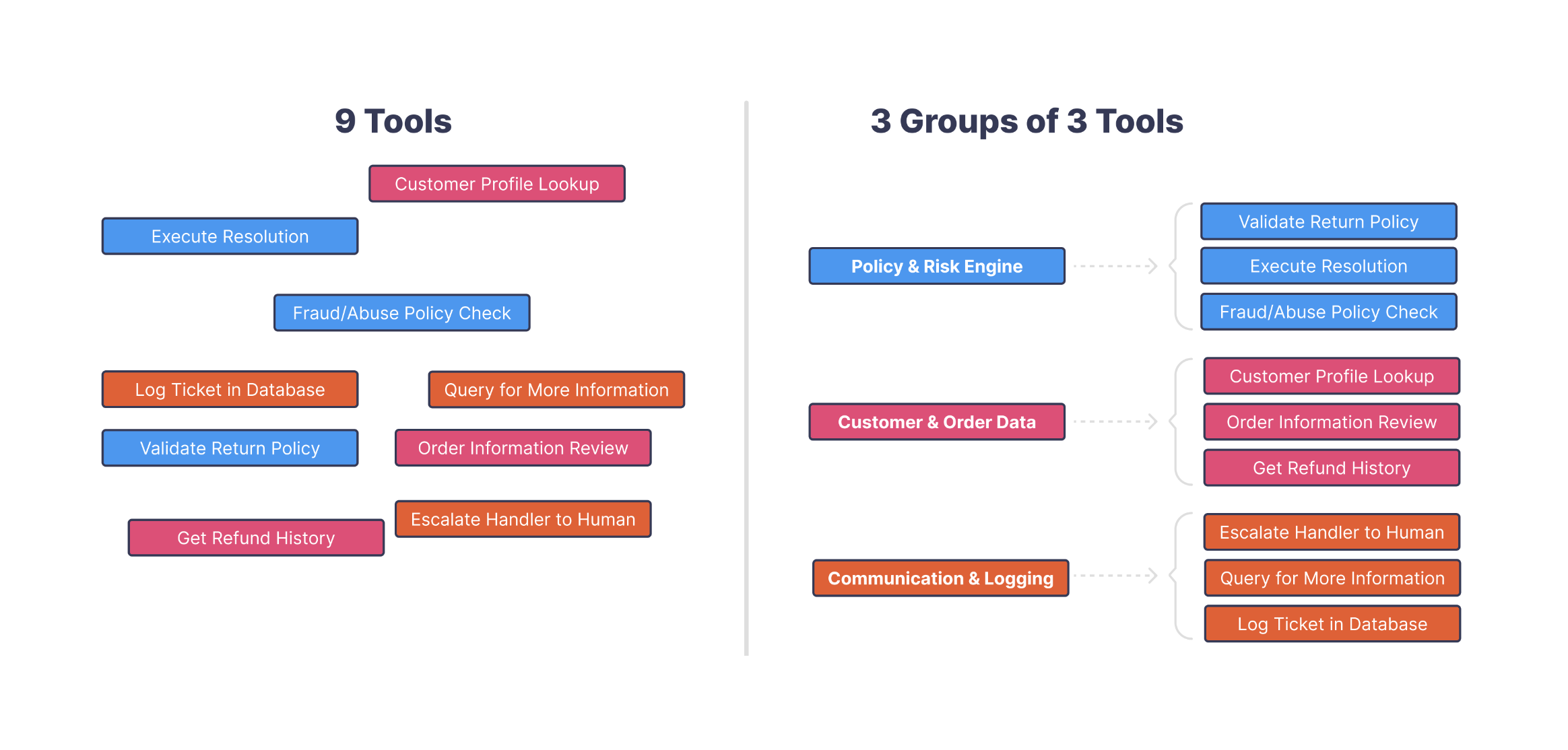
This agent had to modify dozens of different account attributes—names, addresses, roles, preferences, notifications, billing details—and for this customer that meant working with over a hundred individual tools. Many of them overlapped in subtle ways. There were different tools for updating first names, legal names, display names, internal labels, and alternate contact fields. The intent was usually obvious, but the mapping from intent → tool was not.
The Problem
When the training algorithm began searching this space, it consistently ran into the same pattern: the model wasn't misinterpreting the user, it was simply choosing the wrong tool. With so many tools that sounded almost the same, the planning stage became unstable. The same test case might pick the right tool once, a near-duplicate tool the next time, and a completely unrelated tool if the context shifted slightly.
The Solution
To fix this, the system learned a layered tool-selection pattern. Instead of asking the model to pick directly from a list of 100+ tools, it first learned to classify the request into a tool group—things like "update_account_field," "update_contact_info," or "update_billing_info." After that, it made a second, much narrower decision inside the group. This two-step structure dramatically reduced tool confusion and gave the agent a stable way to navigate such a large tool surface. Here is a small example of this:
How It Emerged
This behavior emerged through clever use of feature flags. Each tool group, each tool description, and even parts of the planning instructions were parameterized as flags the algorithm could toggle on or off. As it ran thousands of trials, it learned which combinations produced the cleanest plans—effectively learning which grouping strategy worked best and which fields belonged together. Instead of hard-coding a taxonomy of tools, the system learned one by exploring these feature-flag parameters.
Model Selection
Once the tool space was reorganized, the algorithm also found that Claude Sonnet 4.5 handled these structured decisions more reliably than the previous model. Sonnet's strong tool-use behavior and stepwise reasoning made it an ideal fit for this layered design.
Takeaway
The account-updating agent didn't just need better prompts and cleaner context—it needed a better structure for its tools. By discovering tool groups via feature-flag search, learning a layered selection pattern, and pairing it with the right model, the algorithm turned a messy, overlapping tool surface into a stable and predictable workflow.
Complex Workflow Agent
The final agent in the system handled a different category of work: a small number of extremely long, multi-step workflows that touched many parts of the platform. These weren't simple updates or Q&A tasks—they were multi-stage processes with branching logic, dependencies, validations, and several tool calls that had to happen in the right order. Because of that, the prompts were large, the context was heavy, and the margin for instability was much higher.
After the first round of training, we saw a good improvement (+15%) from the usual fixes—cleaner prompts, slimmer context windows, and the right model choice—but it was clear that this agent still had structural issues. Some workflows were simply too complex to express cleanly in a single prompt. They required long sequences of reasoning that had to be consistent every time, not re-derived from scratch.
To address this, we introduced a new trainable parameter called "file". This gave the model a place to store persistent, structured behaviors—very similar to what Anthropic describes as skills. Instead of forcing the agent to reconstruct long decision paths each time, these complex workflows could be broken into reusable pieces and stored in "file".
Once "file" became part of the search space, the training algorithm began using it to build out these skills automatically. For example, consider a workflow like creating a proposal for adding a new item. This requires several sub-tasks:
•
validating the item
•
adding it to a cart
•
continuing through checkout logic
•
checking for conflicts or missing data
•
formatting the final proposal
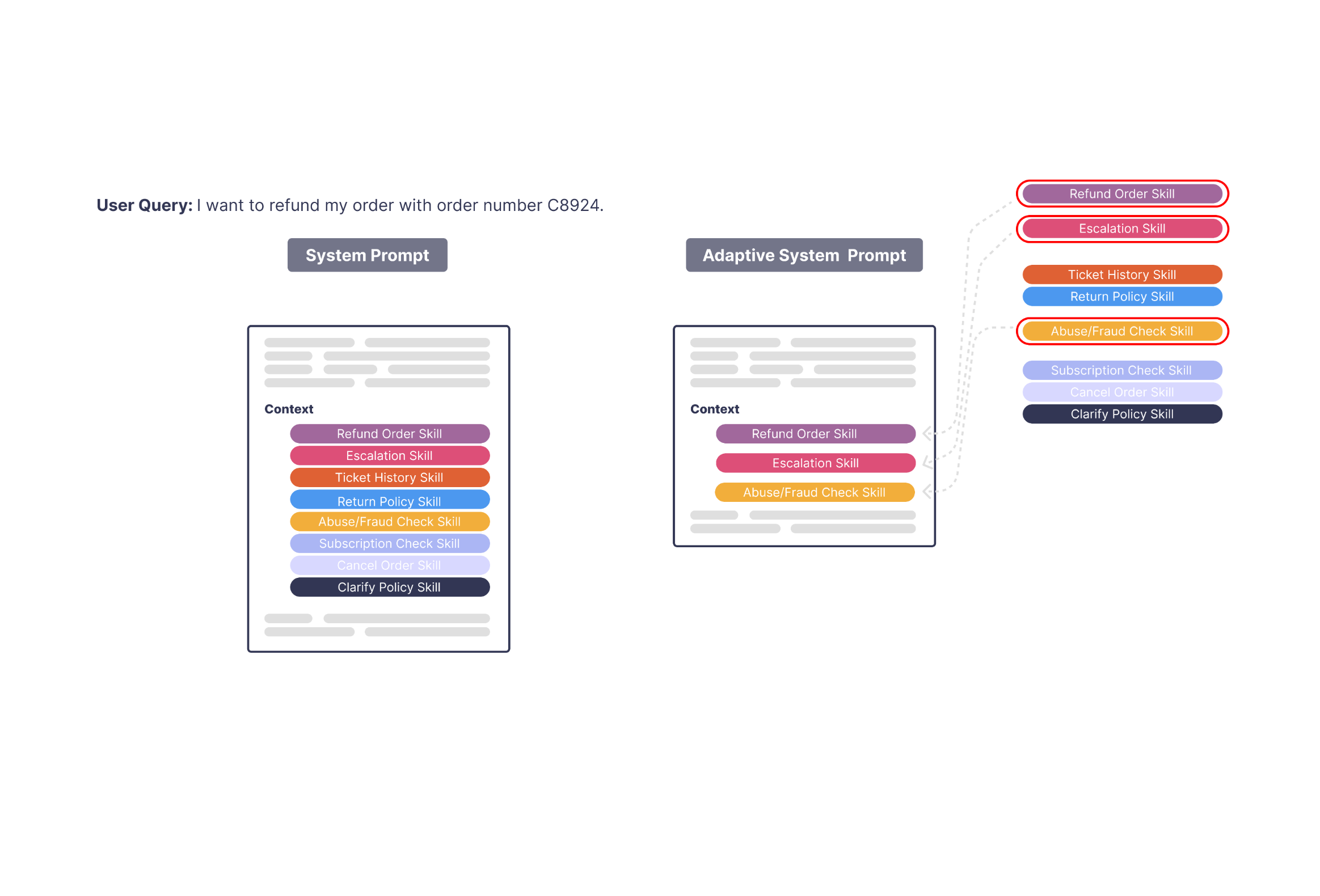
Before skills, the agent had to re-plan all of these steps every time, which led to drift and inconsistency. After skills, these sub-processes were represented as callable units—almost like custom tools that could be invoked whenever needed.
This paired naturally with the two-layer reasoning pattern the system already used. With layers = 2, the agent first decided which high-level skill to use, then executed it with the right parameters. And unlike earlier agents, which focused on cleaning up user queries, this agent was now modifying its own internal reasoning context—pulling in structured skills instead of recomputing everything in the prompt.
Once these skills were learned and integrated, the hardest workflows became dramatically more stable. The agent no longer needed to generate long plans from scratch; it could re-use consistent, pre-optimized behaviors stored in the file.
Takeaway
This agent didn't just need better prompts—it needed a way to store multi-step reasoning itself. By adding a trainable file parameter and letting the algorithm build out reusable skills, we turned long, fragile workflows into stable, callable procedures that would have been extremely difficult to engineer by hand.
Verification Agent
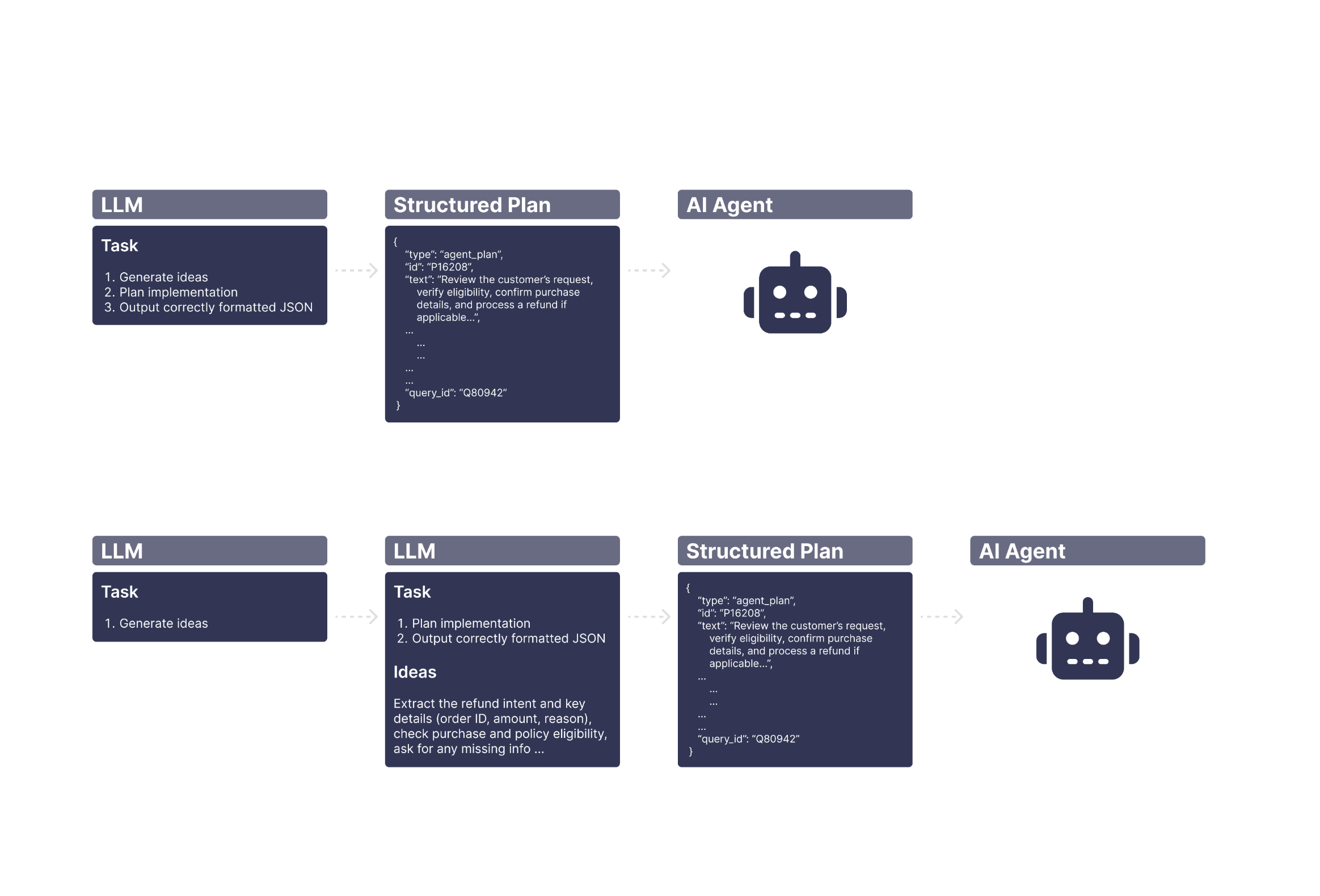
For this agent, the biggest gains still came from rewriting the prompts and cleaning up the context. But the next meaningful improvement came from restructuring the workflow itself. The original design tried to plan and execute in a single step, which overloaded the prompt and made the behavior unpredictable.
We split the workflow into two stages—first create the plan, then format and execute it—and treated that separation as a trainable parameter. Once the prompts were updated for each stage and the context was cleaned up, the agent became significantly more stable. Planning stopped bleeding into execution, execution stopped reinterpreting the plan, and the overall accuracy improved in a way the single-step workflow couldn't support.
Results
To measure progress, we used three tiers of test cases—easy, medium, and hard—each evaluated with a reliability-focused method adapted from Sierra's Tau framework. Every test case was run 5 Tau passes with multiplicity 3, which allowed us to measure not just correctness but stability across repeated runs.
1. Non-Regression Tests
Before
~95%
After
~100%
These were the "must not break" scenarios.
2. Easy Test Cases ("Tau" Passes)
Before
~90%
After
~97%
50 cases × repeated Tau evaluations.
3. Medium Test Cases
Before
~82%
After
~95%
Another 50 cases, each with 15 total runs (5 Tau passes × 3 multiplicity).
4. Hard Test Cases
Before
~50%
After
~77%
These were structurally complex or required tools the customer didn't actually have.
Overall Improvement
Across all tiers, when weighted by production frequency, the customer's average accuracy moved from ~75% to ~92%.
The largest gains came from stabilizing the easy and medium cases—where the agent actually knew the answer but simply couldn't produce it consistently before training.
Conclusion
Across the entire system, the biggest driver of improvement was still the same core idea: if you fix the prompts and clean up the context, everything downstream becomes more reliable. Most of the original failures weren't due to lack of capability—they were due to noise, ambiguity, and inconsistent framing. Once those were removed, the agents finally behaved the way the customer always expected them to.
But the most exciting part wasn't just rewriting prompts. It was discovering that we could expose entirely new trainable parameters—tool grouping, layered planning, adaptive context flags, and even reusable "skills"—that allowed the algorithm to automate the parts of agent design that normally require deep manual effort. Instead of treating prompt engineering and context shaping as static, human-driven tasks, we turned them into parameters the system could optimize on its own.
The end result was a move from 75% → 92% accuracy on real customer queries, driven not just by better text, but by a more structured, more learnable agent architecture. Prompt and context optimization will always matter most, but these new trainable components show how far you can push automation when you treat agents as systems that can be continuously trained—not manually tweaked.
Note on Anonymization and Confidentiality
This case study has been fully anonymized at the request of the enterprise customer. All identifying details—including agent configurations, workflow design, tool usage, and operational parameters—have been modified or abstracted to protect proprietary information and ensure confidentiality. Certain elements have also been generalized or replaced with representative examples. The customer has reviewed and approved the publication of this anonymized case study.
Note on Technical Simplification
For clarity and readability, several aspects of the agent's architecture and implementation have been simplified. The underlying system involves additional complexity not reflected here. Test scenarios, evaluation methods, and agent behaviors have been adapted or restructured to illustrate key concepts without disclosing sensitive or non-public technical details.